Documentation engineers build the infrastructure that ships products to readers. We wire up Git repos, configure linters, write CI/CD workflows, wrangle multi-format outputs, and maintain content taxonomies. We do all of this across a patchwork of tools that were never designed to work together.
Copilot writes prose faster. GitBook gives you somewhere to publish. Vale catches style violations. But no single tool treats the pipeline from source to reader as one system. I went looking for one. I couldn’t find it. So I built a prototype to see what it would look like.
This post is a build log. What I built, why I made the choices I made, and what I learned along the way.
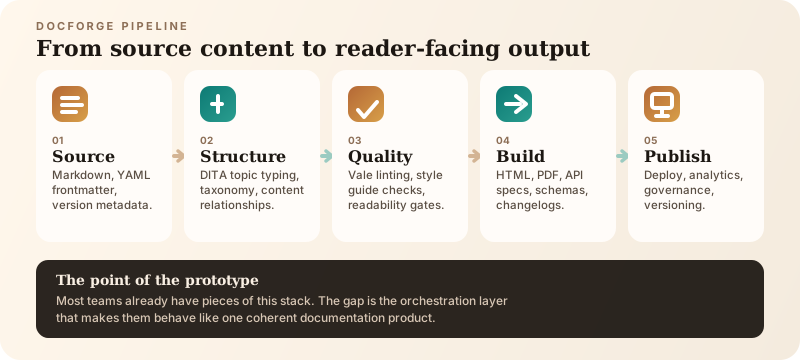
DocForge is meant to make the documentation pipeline legible. The point is not just better writing tools. The point is a system where source, structure, quality, build, and publishing are connected.
The diagram above is the shortest version of the pitch: documentation teams do not just need a place to write. They need a pipeline they can understand, audit, and improve.
What DocForge actually is
DocForge is a working interactive demo with six modules, each representing a stage of the documentation pipeline:
Module 1: Dashboard. Build history with commit hashes and pass/fail status metrics broken down by DITA topic type. Contributor activity. Open doc issues. This is the module I wished existed at every company I have worked at, a single view that tells you whether your docs pipeline is healthy or broken without opening five different tools.
Module 2: Editor. The YAML frontmatter isn’t decorative. It carries structured metadata: topic type, audience, version, sidebar position, tags. This is what lets the rest of the pipeline treat content as structured data instead of flat files.
Module 3: Content Map. A DITA-based topic taxonomy showing how every document is classified: Concept, Task, Reference, Tutorial, Troubleshoot.
Module 4: Style Linter. Automated quality checks running Vale rules against Microsoft Writing Style Guide standards. The demo shows a score of 94 with seven findings across four files, including a passive voice flag, a task-first structure violation, a readability warning, and a terminology inconsistency. These are not generic linting categories. They are the exact kinds of issues I have spent years fixing in real documentation reviews.
Module 5: Build Outputs. Six formats generated from a single Markdown source: static HTML, PDF, OpenAPI spec, JSON schema, Postman collection, and changelog. The fundamental promise of Docs-as-Code is that your source is your single source of truth and everything else is a build artifact.
Module 6: Configuration. A full docforge.config.yml with toggleable settings for build, lint, deploy, versioning, search, and analytics. Environment-aware. The kind of config file that every Docs-as-Code project eventually needs and nobody enjoys writing from scratch.
The demo uses a fictional project called “ACME Platform Documentation” with 147 pages, 1,284 Git commits, and a 4.2-second build time. The numbers are illustrative, but the structure is drawn directly from real documentation systems I have managed.
Why DITA topic typing in a Docs-as-Code prototype
This is the design decision I expect the most questions about. DITA (Darwin Information Typing Architecture) is an XML-based content standard. Docs-as-Code is Markdown and Git. These two worlds do not usually talk to each other.
I included DITA topic typing deliberately. Not the XML. Not the toolchain. Just the taxonomy.
DITA’s five core topic types, Concept, Task, Reference, Tutorial, and Troubleshoot, represent something genuinely useful: a structured way to classify what a piece of documentation is trying to do. A Concept topic explains what something is. A Task topic tells you how to do something. A Reference topic gives you lookup information. These are not arbitrary labels. They enforce a discipline about purpose.
The problem I have seen repeatedly in enterprise documentation is not that writers lack tools. It is that they lack structure. A “guide” might start as a concept overview, drift into procedural steps, detour through API parameters, and end with troubleshooting. That is not a guide. That is four topics welded together. DITA topic typing gives you a vocabulary to prevent that drift.
| Topic Type | Purpose | What it prevents |
|---|---|---|
| Concept | Explains what something is | Background buried inside task topics |
| Task | Tells you how to do something | Steps mixed with reference data |
| Reference | Provides lookup information | Narrative prose in parameter tables |
| Tutorial | Guides you through a complete workflow | Fragmented how-to steps with no context |
| Troubleshoot | Diagnoses and resolves a problem | Debugging steps scattered across guides |
DocForge borrows the taxonomy without importing the overhead. Content is still Markdown. The topic type lives in YAML frontmatter. The Content Map module visualizes the taxonomy. The Style Linter includes a custom TaskFirst rule that flags task topics that open with background context instead of the user’s goal.
This is the kind of structural enforcement that no off-the-shelf tool gives you. Confluence does not care whether your page is a concept or a task. GitBook does not validate topic structure. And AI writing assistants have no concept of information architecture at all.
What the linter actually catches
The Style Linter module is the one I am most particular about because I have spent years doing exactly this work manually.
| Rule | Category | Severity | Example issue |
|---|---|---|---|
| Microsoft.Passive | Style | Warning | Passive voice obscures actor in procedures |
| DocForge.TaskFirst | Structure | Error | Task topic opens with background, not goal |
| Vale.Readability | Readability | Warning | Grade 14.2 against target of grade 10 |
| Microsoft.Wordiness | Style | Info | “In order to” used instead of “To” |
| DocForge.Terminology | Consistency | Error | “API key” capitalized three different ways |
| DocForge.ProgressiveDisclosure | Architecture | Warning | Reference page exceeds 2,500 words |
| DocForge.CodeSamples | Completeness | Error | Four endpoints missing Go and Ruby samples |
Let me walk through the seven findings in the demo because they illustrate the kinds of quality problems that slip through in real documentation all the time.
Passive voice (Microsoft.Passive): “The payment was declined by the issuing bank.” The fix is “The issuing bank declined the payment.” This is a standard Vale rule from the Microsoft Style Guide package. Passive voice is not always wrong, but in procedural documentation it obscures who is doing what, and that matters when a developer is debugging a failed API call at 2 AM.
Task-first violation (DocForge.TaskFirst): A task topic opens with “Webhooks are a way to…” instead of leading with the user’s goal. This is a custom rule. It enforces Carroll’s Minimalism principle: lead with the action, provide background only when the reader needs it. I have seen entire documentation sets where every how-to page opens with two paragraphs of context before the first step. The reader came to do something. Let them do it.
Readability (Vale.Readability): Flesch-Kincaid grade level of 14.2 against a target of grade 10. Developer docs should not read like academic papers. A grade-10 ceiling forces you to break up long sentences and replace jargon with plain language. This is not about dumbing things down. It is about respecting the reader’s time.
Wordiness (Microsoft.Wordiness): “In order to” should be “To.” Three occurrences. This is the kind of thing that creeps in when writers are drafting fast and nobody is reviewing at the sentence level.
Terminology inconsistency (DocForge.Terminology): “API key” versus “API Key” versus “api key” across multiple files. This is a documentation-specific rule. Inconsistent capitalization erodes trust. If the docs cannot agree on how to write the product’s own terminology, why would a developer trust the technical accuracy?
Progressive disclosure (DocForge.ProgressiveDisclosure): A reference page exceeds 2,500 words. The recommendation is to split it into sub-topics. Long reference pages are a symptom of not thinking about information architecture. A developer looking up a single endpoint parameter should not have to scroll through 2,500 words of every endpoint in the API.
Missing code samples (DocForge.CodeSamples): Four endpoints are missing SDK examples in Go and Ruby. If you support a language, your docs should cover it. Gaps in code sample coverage are one of the fastest ways to lose developer trust.
These are not theoretical lint rules. Every single one of them comes from a real problem I have encountered in production documentation.
The gap this prototype is pointing at
I have spent twenty years writing documentation for enterprise platforms: FinTech, financial crime compliance, payments, investment banking, enterprise communications. I have used MadCap Flare, DITA/XML authoring tools, Confluence, GitHub wikis, Docs-as-Code with Markdown and static site generators, and more recently, AI-assisted writing tools.
Here is the pattern I keep seeing. Every documentation team I have worked with eventually needs the same set of capabilities: version control, structured content classification, automated style enforcement, multi-format publishing, pipeline monitoring, and a configuration layer that ties it all together. And every team assembles this from a different patchwork of tools, glued together with custom scripts and tribal knowledge.
The tools that exist today solve pieces of the problem well. Vale is excellent at style linting. GitHub Actions handles CI/CD. Static site generators like Docusaurus and Hugo produce great HTML output. But nobody has built the layer that connects them into a coherent pipeline designed specifically for documentation teams.
Copilot and other AI writing tools are solving a different problem entirely. They help you write faster. They don’t help you build a documentation system that is reliable, auditable, and scalable. They have no concept of topic taxonomy, no opinion about content structure, no mechanism for enforcing quality gates before content reaches readers.
GitBook, Confluence, Mintlify, and ReadMe are publishing platforms. They give you somewhere to put your docs. They don’t engineer the pipeline that produces them. There is a real difference between a writer who uses a docs tool and an engineer who builds the infrastructure behind it.
That is the gap DocForge is pointing at. Not a missing feature in an existing tool. A missing category of tool altogether.
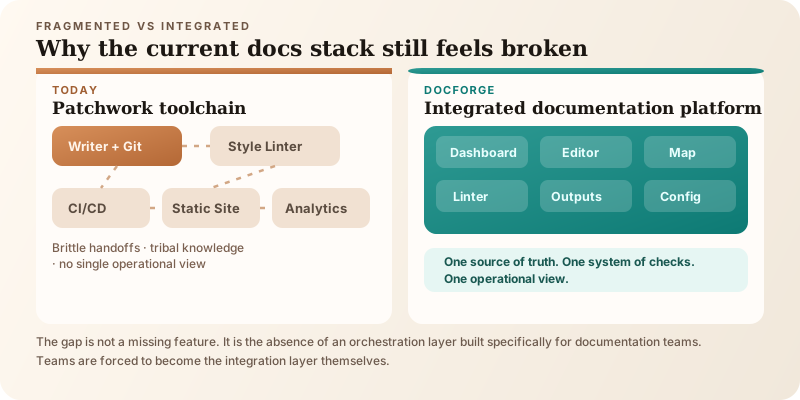
The gap is not a missing single feature. It is the absence of an orchestration layer built specifically for documentation teams.
What this prototype is and is not
DocForge is an interactive prototype. It is a working demo that shows what a Docs-as-Code platform could look like if someone built it as an integrated system. The editor renders real Markdown. The linter findings are realistic. The build outputs show real format previews. The config file is a real YAML structure that could drive a real pipeline.
It is not a production tool. There is no backend processing Markdown through an actual Vale server. The build outputs are previews, not generated artifacts. The Git integration is simulated.
I built it as a portfolio piece to show that I understand the infrastructure behind the docs, not just the writing. But as I built it, I kept thinking: this should actually exist. Not as a demo. As a product.
The real product is what I am building toward.
One question
If you work in documentation, I am genuinely curious: what is the most painful part of your pipeline right now?
Not your writing workflow. Your pipeline. The system that takes your source content and gets it to readers. Where does it break? What do you spend the most time fighting with?
I am asking because I want to know whether the gap I see from twenty years of enterprise documentation is the same gap other people are struggling with, or whether every team’s pain is different enough that an integrated tool would miss the mark.
If you have five minutes and want to see what I built, the demo is below. No login. No signup. Start with the Dashboard module — it shows immediately what I mean about pipeline visibility. You can also go straight to the DocForge platform.
Sulagna Sasmal is a Documentation Engineer, Information Architect, and AI Tools Builder with twenty years of experience in enterprise software documentation. She writes about documentation engineering, Docs-as-Code, and the tools that documentation teams actually need.
Portfolio: sulagnasasmal.com · LinkedIn: linkedin.com/in/sulagnasasmal · GitHub: github.com/SulagnaSasmal
Discussion
When was the last time an AI tool generated documentation that passed your review without edits? Not 'good enough to fix.' Actually passed.